

WhatsApp AI Writing Help: WhatsApp has launched AI-powered Writing Help, a new feature that lets you adjust the tone of your messages with one tap. It is rolling out in English first with strong privacy protections.
Say it the way you mean it
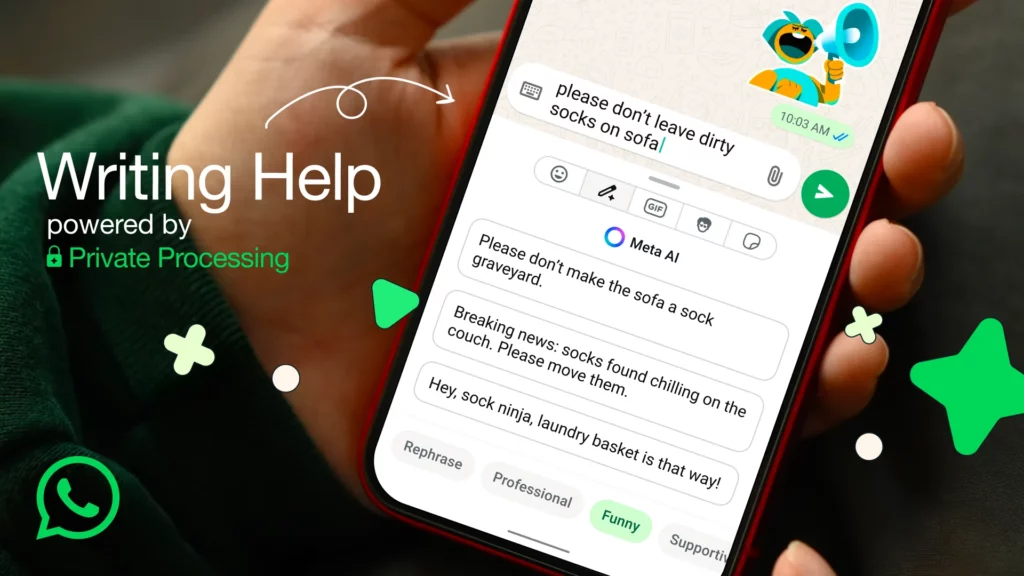
We have all typed a message, stopped, and wondered: Does this sound too blunt? Too formal? Too casual? WhatsApp new Writing Help is built for those moments. The feature adds a small pencil icon inside the chat bar that can instantly rephrase what you wrote. With one tap, it offers alternatives that sound more professional, kinder, or even funnier helping you strike the right tone before sending.
The rollout has started in English for users in the United States and a handful of other countries, with more languages and regions planned later this year.
How Writing Help works
Using Writing Help feels effortless. You start by typing your message like you normally would. Once you do, a small pencil icon appears next to the text box. Tapping it instantly opens a set of AI-generated suggestions.
These suggestions are not just grammar fixes they focus on tone. You can choose to make your message sound more professional, more supportive, a bit more playful, or simply get a cleaner rephrased version.
During early testing on iOS, users noticed that WhatsApp usually offers at least three different alternatives, giving you options without overwhelming you.
To see how it works in practice: a simple line like “Can we talk later?” could turn into “Would it be possible to connect later today?” if you want something more formal. Or, if you prefer a relaxed approach, you might see “Hey, let’s catch up later!” appear as a suggestion.
The best part is that the person on the other end never knows you used Writing Help. The final message arrives looking completely natural, as if you typed it yourself.
Privacy is at the core
WhatsApp stresses that Writing Help is powered by Private Processing, a secure system designed so neither WhatsApp nor Meta can read your original message or the AI suggestions. All requests are encrypted, anonymized, and not stored on company servers.
Independent security firms including NCC Group and Trail of Bits have reviewed the architecture, while Cloudflare and Fastly play a role in keeping requests private through transparency logs and relay systems.
Importantly, Writing Help is off by default. To try it, users need to enable Private Processing in Settings under Chats. Once activated, the pencil icon will appear when you type.
Why it matters
Many people already copy text into outside AI tools to refine tone, but that can mean extra steps and privacy risks. By baking Writing Help directly into WhatsApp, users can polish messages without leaving the app or sacrificing security.
From replying politely to a manager, to cheering up a friend, to making a joke land better, this small tool has the potential to improve millions of everyday conversations.







